iMapIt Pro4.1
Publisher Description

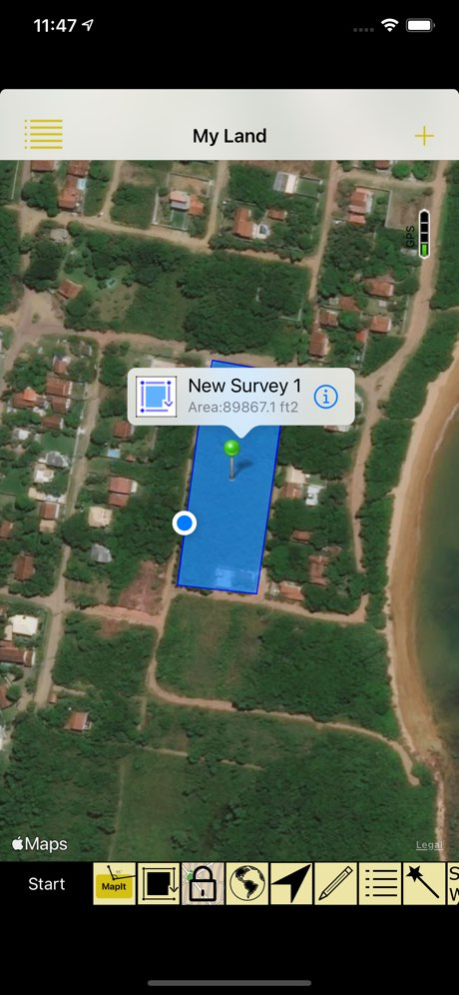


Use your iPhone / iPad's GPS to map, measure or simply record places important to you. Your device will be a GPS receiver and will collect geographic coordinates wherever you are. GPS needs satellite’s visibility. Thus, the more open your space, the better the accuracy of measurements.
* Geographic coordinates collection formats:
. Points - Mark specific places with a point, such as the place you most like to go to, or the starting point of a race, or even the point where you saw a rare bird;
. Lines or paths - A sequence of points forming a line to mark a trail where you have walked, or the path you have taken on a run, or the path to your new house, either the location of a new fence you want to build. All mapped lines are measured for you in metric and imperial units;
. Areas or polygons - A sequence of points, forming a closed region, to mark land that you are interested in buying, or show the map of your land, or measure the outline of your new house, or delimit the region where you want to build a pool. All mapped areas are calculated for you in metric, imperial and Thai units;
* How to collect coordinates:
. Manually: You position yourself and tap the MapIt button to collect a coordinate;
. Automatically by Time: A coordinate is collected at each defined time interval;
. Automatically by Distance: A coordinate is collected at each interval of a pre-defined distance;
. Automatically by Direction: A coordinate is collected each time you change the direction of your displacement at an angle greater than a defined limit;
* Presentation within iMapIt:
Points, lines and polygons can be represented by different types of pins, colors, strokes and fills.
* Export your surveys:
. In these formats: DXF, KML, GPX or CSV;
. Using these projections: UTM or Gauss Krüger, or directly the collected geographical coordinates;
. Sending via: eMail, or directly from your device via iTunes (cable), or even more professionally, transferring to a Web server previously prepared to receive them;
* Editing functions of surveys performed:
. Feature duplication;
. Union of existing features;
. Division of a feature in two;
. Deletion of unwanted coordinates;
. Automatic cleaning of unnecessary points;
. Move a feature to a new project;
Disclaimer on the accuracy of the surveys:
All points, paths or areas are surveyed using the GPS accuracy of your device. This is not a professional precision GPS equipment. So your surveys may vary when compared to the actual dimensions.
Version History Adapting the App to Dark Mode and bug fixing. 4.1 08/08/2021 Fully revised version with a new look.
* New forms of coordinate collection were added:
. Manually: As it already existed in previous versions, you position yourself and tap on the MapIt button to collect a coordinate;
. New - Automatically by Time: A coordinate is collected at each defined time interval;
. New - Automatically by Distance: A coordinate is collected at each interval of a pre-defined distance;
. New - Automatically by Direction: A coordinate is collected each time you change the direction of your displacement at an angle greater than a defined limit;
* The map can now follow your displacement and rotate pointing to the direction of your movement;
* Editing functions for surveys carried out were introduced:
. Feature duplication;
. Union of existing features;
. Division of a feature in two;
. Deletion of unwanted coordinates;
. Automatic cleaning of unnecessary points;
. Move a feature to a new project;
* Detailed statistics added for each measurement;
* Bug fixes. 4.0.1 12/20/2020 Fully revised version with a new look.
* New forms of coordinate collection were added:
. Manually: As it already existed in previous versions, you position yourself and tap on the MapIt button to collect a coordinate;
. New - Automatically by Time: A coordinate is collected at each defined time interval;
. New - Automatically by Distance: A coordinate is collected at each interval of a pre-defined distance;
. New - Automatically by Direction: A coordinate is collected each time you change the direction of your displacement at an angle greater than a defined limit;
* The map can now follow your displacement and rotate pointing to the direction of your movement;
* Editing functions for surveys carried out were introduced:
. Feature duplication;
. Union of existing features;
. Division of a feature in two;
. Deletion of unwanted coordinates;
. Automatic cleaning of unnecessary points;
. Move a feature to a new project;
* Detailed statistics added for each measurement. 4.0 11/30/2020 Bug fixes. 3.4.2 02/15/2020 Bug fixes. 3.4 05/19/2019 * User registration feature temporarily removed;
* Added to the Export screen an an option to include the other measurement units along with the description of each feature, for KML and GPX file formats;
* Fix exporting bugs; 3.3 12/03/2018 * Created a Wizard for guidance on how to perform measurements / surveys;
* The unit of measurement displayed on the map is defined according to the user location and can be changed in Settings;
* The perimeter of the survey of the closed regions is presented together with the area;
* The dimension of each arc segment of a linear or closed region can also be viewed directly on the map;
* Added CSV format for project exporting;
* Included user registration; 3.2 06/12/2017 The visual structure of the application has been completely redesigned for improving usability and intuitiveness. Every application control is now called from the map screen, which became the main screen.
There are now various types of pins for the points representation, colors and different types of lines, as well as alternative colors to fill polygons.
Categories can be assigned to the measurements so that you can classify them visually within iMapIt. These categories can be set before you start your measurements or may be changed after you collected the features.
A GPS accuracy indicator was included on the map for you to know when your measurements will be using the better accuracy of your device.
In the export function a new projection was included for converting exported measurements, the Gauss Krüger projection, as well as new ellipsoids for converting the UTM projection. Now the last ten sites where the measurements were exported to are stored for immediate access without having to type them again when using the Web export option. 3.0 05/01/2016 "Device ID" included in exported files and also sent through Web as a POST parameter "DeviceId".
The polygons area is now also calculated in Thai units (Rai / Ngan / Tarang Wah).
Export default settings applied for each file format. 2.1 07/10/2013 Updated to use iPad screen.
Added new export format - GPX.
Addeed new option to send the exported file to a web server. 2.0 04/01/2013 Bug fix: Crash when entering Export screen. 1.5 01/10/2013 Updated to iOS 6.
The export feature now allows:
* To export using geographical coordinates (latitude and longitude) or the UTM projection (Universal Transverse Mercator);
* To export the coordinate correspondent to the latitude in the X axis or in the Y axis in the projection of file type chosen;
* The change of the exported file name;
* Bug fixes in DXF file generation. 1.4 10/31/2012 Bug fixes in DXF file generation. Included layer definition. Some CAD versions need layer information. 1.3 08/06/2012 Support for metric and imperial units.
Now the app shows local coordinates and GPS accuracy while surveying.
Area and length information were added to the surveys description in exported KML files.
Bug fixes. 1.2 02/08/2012 Support for french language.
Bug fixes. 1.1 01/05/2012 1.0 12/10/2011
About iMapIt Pro
The company that develops iMapIt Pro is Marcus B B E Silva. The latest version released by its developer is 4.1.
To install iMapIt Pro on your iOS device, just click the green Continue To App button above to start the installation process. The app is listed on our website since 2026-10-07 and was downloaded 0 times. We have already checked if the download link is safe, however for your own protection we recommend that you scan the downloaded app with your antivirus. Your antivirus may detect the iMapIt Pro as malware if the download link is broken.
How to install iMapIt Pro on your iOS device:
- Click on the Continue To App button on our website. This will redirect you to the App Store.
- Once the iMapIt Pro is shown in the iTunes listing of your iOS device, you can start its download and installation. Tap on the GET button to the right of the app to start downloading it.
- If you are not logged-in the iOS appstore app, you'll be prompted for your your Apple ID and/or password.
- After iMapIt Pro is downloaded, you'll see an INSTALL button to the right. Tap on it to start the actual installation of the iOS app.
- Once installation is finished you can tap on the OPEN button to start it. Its icon will also be added to your device home screen.
Program Details
System requirements
Download information
Pricing
Version History
version 4.1
posted on 2026-10-07
Version History Adapting the App to Dark Mode and bug fixing. 4.1 08/08/2021 Fully revised version with a new look.
* New forms of coordinate collection were added:
. Manually: As it already existed in previous versions, you position yourself and tap on the MapIt button to collect a coordinate;
. New - Automatically by Time: A coordinate is collected at each defined time interval;
. New - Automatically by Distance: A coordinate is collected at each interval of a pre-defined distance;
. New - Automatically by Direction: A coordinate is collected each time you change the direction of your displacement at an angle greater than a defined limit;
* The map can now follow your displacement and rotate pointing to the direction of your movement;
* Editing functions for surveys carried out were introduced:
. Feature duplication;
. Union of existing features;
. Division of a feature in two;
. Deletion of unwanted coordinates;
. Automatic cleaning of unnecessary points;
. Move a feature to a new project;
* Detailed statistics added for each measurement;
* Bug fixes. 4.0.1 12/20/2020 Fully revised version with a new look.
* New forms of coordinate collection were added:
. Manually: As it already existed in previous versions, you position yourself and tap on the MapIt button to collect a coordinate;
. New - Automatically by Time: A coordinate is collected at each defined time interval;
. New - Automatically by Distance: A coordinate is collected at each interval of a pre-defined distance;
. New - Automatically by Direction: A coordinate is collected each time you change the direction of your displacement at an angle greater than a defined limit;
* The map can now follow your displacement and rotate pointing to the direction of your movement;
* Editing functions for surveys carried out were introduced:
. Feature duplication;
. Union of existing features;
. Division of a feature in two;
. Deletion of unwanted coordinates;
. Automatic cleaning of unnecessary points;
. Move a feature to a new project;
* Detailed statistics added for each measurement. 4.0 11/30/2020 Bug fixes. 3.4.2 02/15/2020 Bug fixes. 3.4 05/19/2019 * User registration feature temporarily removed;
* Added to the Export screen an an option to include the other measurement units along with the description of each feature, for KML and GPX file formats;
* Fix exporting bugs; 3.3 12/03/2018 * Created a Wizard for guidance on how to perform measurements / surveys;
* The unit of measurement displayed on the map is defined according to the user location and can be changed in Settings;
* The perimeter of the survey of the closed regions is presented together with the area;
* The dimension of each arc segment of a linear or closed region can also be viewed directly on the map;
* Added CSV format for project exporting;
* Included user registration; 3.2 06/12/2017 The visual structure of the application has been completely redesigned for improving usability and intuitiveness. Every application control is now called from the map screen, which became the main screen.
There are now various types of pins for the points representation, colors and different types of lines, as well as alternative colors to fill polygons.
Categories can be assigned to the measurements so that you can classify them visually within iMapIt. These categories can be set before you start your measurements or may be changed after you collected the features.
A GPS accuracy indicator was included on the map for you to know when your measurements will be using the better accuracy of your device.
In the export function a new projection was included for converting exported measurements, the Gauss Krüger projection, as well as new ellipsoids for converting the UTM projection. Now the last ten sites where the measurements were exported to are stored for immediate access without having to type them again when using the Web export option. 3.0 05/01/2016 "Device ID" included in exported files and also sent through Web as a POST parameter "DeviceId".
The polygons area is now also calculated in Thai units (Rai / Ngan / Tarang Wah).
Export default settings applied for each file format. 2.1 07/10/2013 Updated to use iPad screen.
Added new export format - GPX.
Addeed new option to send the exported file to a web server. 2.0 04/01/2013 Bug fix: Crash when entering Export screen. 1.5 01/10/2013 Updated to iOS 6.
The export feature now allows:
* To export using geographical coordinates (latitude and longitude) or the UTM projection (Universal Transverse Mercator);
* To export the coordinate correspondent to the latitude in the X axis or in the Y axis in the projection of file type chosen;
* The change of the exported file name;
* Bug fixes in DXF file generation. 1.4 10/31/2012 Bug fixes in DXF file generation. Included layer definition. Some CAD versions need layer information. 1.3 08/06/2012 Support for metric and imperial units.
Now the app shows local coordinates and GPS accuracy while surveying.
Area and length information were added to the surveys description in exported KML files.
Bug fixes. 1.2 02/08/2012 Support for french language.
Bug fixes. 1.1 01/05/2012 1.0 12/10/2011
version 4.1
posted on 2021-08-08
Aug 8, 2021
Version 4.1
Adapting the App to Dark Mode and bug fixing.
version 4.1
posted on 2021-08-08
Adapting the App to Dark Mode and bug fixing.
